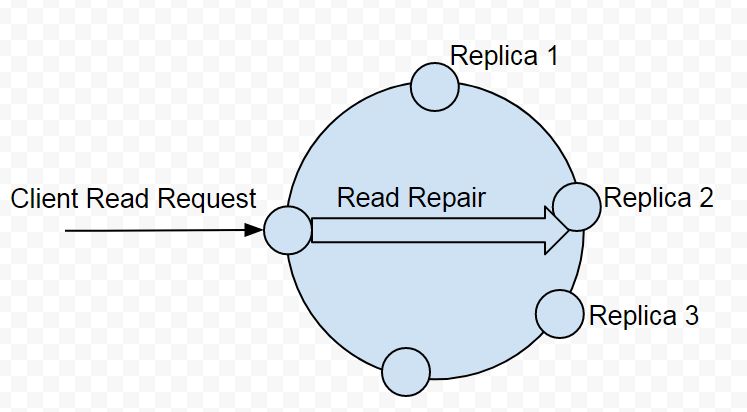
In distributed databases like Apache Cassandra, ensuring data consistency across replicas is a major concern. Cassandra is designed for eventual consistency, meaning that updates are not immediately visible across all replicas. Instead, consistency is maintained over time through background processes. One of the key mechanisms involved in this is Read Repair.
Two important configuration options in this context are:
read_repair_chancedclocal_read_repair_chance
Let’s explore what these options are, how they work, when they are triggered, and how they affect performance and consistency.
🔍 What is Read Repair in Cassandra?
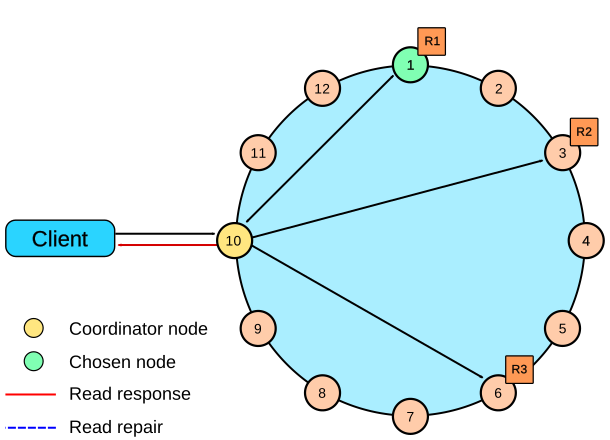 Read Repair is a process in which Cassandra detects and resolves inconsistencies between replicas during read operations. When a read query is made, Cassandra can compare responses from multiple replicas and, if it finds differences, it will repair the outdated replicas by writing the correct data back to them.
This ensures faster convergence toward consistency without waiting for background repair tools to run.
⚙️ read_repair_chance
Definition:
read_repair_chance is a float value between 0.0 and 1.0 that defines the probability that a read repair is triggered on any read query, regardless of the consistency level.
Usage:
CREATE TABLE users (
    id UUID PRIMARY KEY,
    name TEXT,
    email TEXT
) WITH read_repair_chance = 0.1;
How it works:
- At read time, Cassandra may choose to perform a read repair based on this probability.
- It applies to all read requests, even if consistency level is set to
ONE.
Example:
If read_repair_chance is set to 0.1, then 10% of all read operations may trigger a full read repair, where all replicas are queried and inconsistencies are fixed.
⚠️ Warning:
This can significantly impact performance if the value is too high, because read repair involves coordinating multiple replicas.
🌍 dclocal_read_repair_chance
Definition:
dclocal_read_repair_chance also defines a probability (0.0 to 1.0), but applies only to queries at consistency level ONE that target replicas within the same data center.
Usage:
CREATE TABLE users (
    id UUID PRIMARY KEY,
    name TEXT,
    email TEXT
) WITH dclocal_read_repair_chance = 0.1;
How it works:
- Used when
read_repair_chanceis set to 0. - This setting is more efficient, as it avoids cross–data center network traffic.
- Useful in multi-datacenter setups where you want to avoid performance penalties from inter-DC traffic.
✅ When to Use (or Avoid) These Settings
| Scenario | Recommendation |
|---|---|
| High write volume, low read | Avoid high read_repair_chance – use repair tool instead |
| Multi-DC setup | Prefer dclocal_read_repair_chance over read_repair_chance |
| Read-heavy app needing fast consistency | Consider a moderate read_repair_chance (0.1–0.2) |
| Newer Cassandra versions (4.x) | Avoid both – rely on scheduled repair operations |
📉 Deprecation & Best Practices (Cassandra 4.x+)
As of Cassandra 4.0, both read_repair_chance and dclocal_read_repair_chance are deprecated and ignored by default.
Why deprecated?
- Read repairs add unpredictable latency.
- Best practice is to use:
- Scheduled
nodetool repair - Proper consistency levels (e.g.,
QUORUM) - Anti-entropy repair with
Repair Coordinator
- Scheduled
Schema Migration Tip:
If you are getting errors like:
Unknown setting: read_repair_chance
Then your Cassandra version likely does not support these settings anymore. Simply remove them from your CREATE TABLE or ALTER TABLE statements.
🧠 Summary: Key Differences
| Property | read_repair_chance | dclocal_read_repair_chance |
|---|---|---|
| Applies to | All reads | Only DC-local reads at CL.ONE |
| Network impact | High (may span data centers) | Lower (same DC only) |
| Performance hit | Higher | Lower |
| Deprecated | Yes (Cassandra 4.x+) | Yes (Cassandra 4.x+) |
✅ Final Recommendations
- For Cassandra ≤ 3.x: Use low values (e.g.
0.1) only if your application requires quick consistency and tolerates performance cost. - For Cassandra 4.x and above: Avoid using these settings. Stick to explicit consistency levels, scheduled repairs, and monitoring tools.
If you’re designing a high-performance Cassandra schema, always test read performance with and without read repair enabled. Use nodetool repair and proper replication strategies for long-term consistency.