When a driver tries to start an EV charging session using an RFID card, tag, or token, the charging station may reject the attempt and show a message similar to:
{
  "idTagInfo": {
    "status": "Blocked"
  }
}
For a beginner, this message can be confusing. It may look like an OCPI problem, an OCPP problem, a station problem, or even a user account problem. In reality, this response usually belongs to the OCPP authorization flow, while OCPI may only be involved if the tag belongs to an external roaming partner or eMSP.
This article explains, in simple terms, what Blocked means, when it appears, where to search for it, and how to trace the full event in a Kubernetes-based EV charging platform.
What Does idTagInfo.status = Blocked Mean?
The message:
{
  "idTagInfo": {
    "status": "Blocked"
  }
}
means that the tag, card, or token used by the driver was not allowed to start a charging session.
In most cases, the tag is known by the system, but it has been blocked by a business rule, status, contract condition, account restriction, or authorization policy.
A useful interpretation is:
Acceptedmeans the tag is allowed.Invalidmeans the tag is unknown or not valid.Blockedmeans the tag is known but not allowed.Expiredmeans the tag or contract has expired.ConcurrentTxmeans the tag may already be used in another active transaction.
So, if a user receives Blocked, the platform probably recognized the tag but refused the charging request.
Is This an OCPP or OCPI Message?
This is one of the most important points.
The structure:
{
  "idTagInfo": {
    "status": "Blocked"
  }
}
is typically associated with OCPP, not OCPI.
OCPP is the protocol used between the charging station and the central system, often called the CSMS, charging backend, or OCPP broker.
OCPI is usually used between platforms, such as:
- CPO and eMSP
- CPO and roaming hub
- eMSP and roaming platform
- Charging network and external mobility provider
In simple terms:
OCPP = station talks to backend
OCPI = backend talks to another backend/platform
So if a physical tag is scanned at a charger, the first place to investigate is normally the OCPP broker or CSMS, not OCPI.
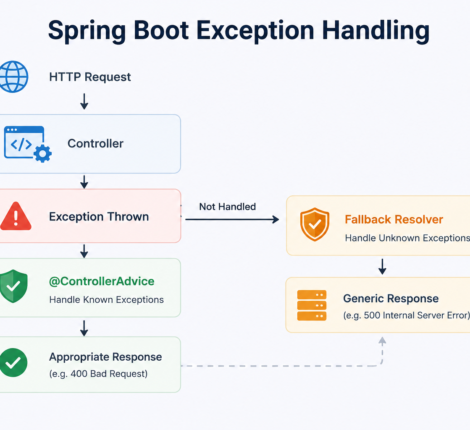
Typical Flow When a Driver Uses a Charging Tag
A normal charging attempt with a tag may look like this:
Driver scans RFID tag
        |
        v
Charging station sends Authorize.req
        |
        v
OCPP broker / CSMS receives the request
        |
        v
Authorization service checks tag, user, contract, fleet, payment, roaming
        |
        v
Backend returns status
        |
        v
Charging station receives Accepted, Blocked, Invalid, or Expired
If the result is Blocked, the flow may look like:
Station -> OCPP Broker: Authorize.req(idTag)
OCPP Broker -> Backend: Check this tag
Backend -> OCPP Broker: Tag is blocked
OCPP Broker -> Station: Authorize.conf(status = Blocked)
Or, in some cases:
Station -> OCPP Broker: StartTransaction.req(idTag)
OCPP Broker -> Station: StartTransaction.conf(status = Blocked)
Common Reasons Why an EV Charging Tag Is Blocked
There are several possible causes.
1. The Tag Was Manually Disabled
The tag may exist in the system but have a status such as:
Inactive
Disabled
Blocked
Suspended
This is one of the most common causes.
2. The Tag Was Reported Lost or Stolen
If the user reported the RFID card as lost or stolen, the platform may block it for security reasons.
The tag is still recognized, but it cannot be used to start a charging session.
3. The User Account Is Suspended
Sometimes the tag itself is technically valid, but the user account behind it is not.
Possible account-level problems include:
User inactive
Driver suspended
Account blocked
Customer disabled
Fleet account disabled
4. The Contract or Subscription Is No Longer Active
The charging tag may depend on an active contract, subscription, or fleet agreement.
The platform may return Blocked if:
Contract expired
Subscription cancelled
Fleet account inactive
Billing account suspended
Customer not allowed to charge
5. Payment or Credit Restrictions
Some systems block charging if payment conditions are not met.
Examples include:
No valid payment method
Unpaid invoice
Credit limit exceeded
Prepaid balance too low
Payment account blocked
Depending on the implementation, these conditions may be mapped to Blocked.
6. The Tag Is Not Allowed at That Location
A tag can be valid in one network but not allowed at another location, CPO, charging group, or connector.
Possible restrictions include:
Not allowed at this CPO
Not allowed at this station
Not allowed at this location
Not allowed for this connector type
Not allowed outside a configured region
In this case, the backend may return Blocked.
7. The Tag Was Replaced
If a user receives a new RFID card, the old one may be disabled.
The old tag may still exist in the database, but its status may be blocked.
8. Roaming Authorization Was Denied
If the tag belongs to an external eMSP or roaming partner, the CPO platform may need to validate it through OCPI or a roaming hub.
In that case, the OCPP broker may receive the tag from the station, ask the roaming/OCPI layer for authorization, and then return Blocked to the station.
Why You May Not See the Same Message in OCPI
A common mistake is to search for this exact JSON in OCPI logs:
{
  "idTagInfo": {
    "status": "Blocked"
  }
}
In most systems, you will not find it there.
That structure belongs to the OCPP side. In OCPI, you should search for the equivalent token or authorization data instead.
In OCPI, useful search fields may include:
token.uid
token.auth_id
token.visual_number
session.id
cdr.id
location_id
evse_uid
connector_id
start_date_time
The key task is to map:
OCPP idTag <-> OCPI token.uid / auth_id / visual_number
Sometimes the OCPP idTag is the same as the OCPI token.uid, but not always. Some platforms use a visual number, RFID UID, contract ID, hash, or internal token identifier.
Where to Start Troubleshooting
The best investigation order is:
1. OCPP broker logs
2. Authorization service logs
3. Token/tag database
4. OCPI logs, only if roaming is involved
5. Session/CDR records, if a session was created
Do not start directly with OCPI unless you already know that the tag is from a roaming partner or external eMSP.
Step 1: Search the OCPP Broker Logs
In a Kubernetes cluster, first look for services related to OCPP, broker, CSMS, charger, or station communication.
Example command:
kubectl get pods -A | egrep -i "ocpp|broker|charger|station|csms"
Then check logs around the time of the failed charging attempt:
kubectl logs -n <namespace> <pod-name> --since=2h | egrep -i "Authorize|StartTransaction|Blocked|idTag|<TAG>"
If the service runs as a deployment:
kubectl logs -n <namespace> deploy/<deployment-name> --since=2h | egrep -i "Authorize|StartTransaction|Blocked|idTag|<TAG>"
You are looking for entries similar to:
Authorize.req idTag=<TAG>
Authorize.conf status=Blocked
or:
StartTransaction.req idTag=<TAG>
StartTransaction.conf status=Blocked
This confirms that the station attempted authorization and the backend returned Blocked.
Step 2: Search the Authorization Backend
In many architectures, the OCPP broker does not make the final business decision. It receives the message from the charger and calls another internal service.
The flow may be:
OCPP Broker -> Authorization Service -> Database
or:
OCPP Broker -> Backend API -> Token Service -> Contract/Fleet Service
Search for deployments related to authorization, tokens, tags, users, drivers, contracts, or fleets:
kubectl get deploy -A | egrep -i "auth|authorization|token|tag|driver|contract|fleet|user"
Then inspect logs:
kubectl logs -n <namespace> deploy/<auth-service> --since=2h | egrep -i "<TAG>|blocked|inactive|disabled|lost|expired|contract|fleet|driver"
The real cause may appear here, for example:
Authorization failed: token blocked
Authorization failed: driver inactive
Authorization failed: contract expired
Authorization failed: fleet account suspended
Authorization failed: token not allowed at location
This is often more useful than the OCPP response itself.
Step 3: Check the Token or Tag Database
If you have database access, search for the tag in token-related tables.
Example:
select *
from tokens
where uid = '<TAG>'
   or auth_id = '<TAG>'
   or visual_number = '<TAG>';
For internal tag tables:
select *
from tags
where id_tag = '<TAG>'
   or tag_uid = '<TAG>'
   or rfid = '<TAG>';
For OCPI-specific token tables, you may have something like:
select id, uid, auth_id, visual_number, valid, whitelist, status, last_updated
from ocpi_tokens
where uid = '<TAG>'
   or auth_id = '<TAG>'
   or visual_number = '<TAG>';
Useful fields to check include:
status
valid
whitelist
user_id
driver_id
contract_id
fleet_id
blocked_reason
last_updated
issuer
party_id
country_code
If you find values such as:
valid = false
status = BLOCKED
whitelist = NEVER
then the root cause is likely in the token configuration.
Step 4: Search OCPI Logs Only If Roaming Is Involved
OCPI becomes relevant if the tag belongs to:
External eMSP
Roaming partner
Hub platform
Another CPO/eMSP integration
Third-party mobility provider
Search for OCPI-related services:
kubectl get pods -A | egrep -i "ocpi|roaming|emsp|cpo|hub"
Then search logs by tag, token, and authorization-related terms:
kubectl logs -n <namespace> <ocpi-pod> --since=2h | egrep -i "<TAG>|token|authorize|session|cdr|blocked|allowed|valid"
If the OCPI service is deployed as a deployment:
kubectl logs -n <namespace> deploy/<ocpi-deployment> --since=2h | egrep -i "<TAG>|token|authorize|session|cdr|blocked|allowed|valid"
Do not search only for Blocked. Also search for terms such as:
valid=false
allowed=BLOCKED
authorization denied
token not allowed
token inactive
whitelist
real-time authorization
Different systems map OCPI authorization failures differently.
Step 5: Understand Whether a Session or CDR Should Exist
If the tag was blocked before charging started, you may not find a session or CDR.
Normally:
Blocked during authorization = no charging session
No charging session = no final CDR
So if the user only tried to start charging and immediately received Blocked, you should expect to find:
Authorize request
Authorization failure
Maybe token lookup
Maybe OCPI authorization call
But you may not find:
Session created
Meter values
CDR generated
Stop transaction
If you do find a session or CDR, then the charging session may have started and failed later for another reason.
Example Investigation Scenario
Assume a user reports that their RFID card was blocked at 14:30.
You have:
Tag: ABC123456
Station: CP-001
Connector: 1
Approximate time: 14:30
First, check OCPP:
kubectl logs -n charging deploy/ocpp-broker --since=3h | egrep -i "ABC123456|Authorize|StartTransaction|Blocked"
You may find:
14:30:04 Authorize.req chargePoint=CP-001 idTag=ABC123456
14:30:04 Authorize.conf chargePoint=CP-001 status=Blocked
Then check authorization service:
kubectl logs -n charging deploy/auth-service --since=3h | egrep -i "ABC123456|blocked|contract|driver|fleet"
You may find:
14:30:04 Authorization failed for token ABC123456: contract inactive
Then check the database:
select *
from tokens
where uid = 'ABC123456';
You may discover:
status = ACTIVE
contract_id = 9001
Then:
select *
from contracts
where id = 9001;
And find:
status = INACTIVE
In this example, the tag itself is not the problem. The linked contract is inactive, and the platform maps that condition to Blocked.
What to Ask the Broker or Platform Provider
If the broker or CSMS is managed by another provider, ask them for the exact authorization decision reason.
Useful questions include:
What OCPP message returned the Blocked status?
Was it Authorize.conf or StartTransaction.conf?
What internal rule caused the Blocked status?
Was the token found locally?
Was the token checked through OCPI?
Was the tag blocked locally, by contract, by account, or by roaming partner?
Is there a correlation ID for the failed authorization?
Can you provide the token mapping between OCPP idTag and OCPI token.uid/auth_id?
A good broker should be able to provide a trace similar to:
Station ID
Connector ID
idTag
Request timestamp
OCPP action
Authorization result
Internal reason
Correlation ID
Optional OCPI request/response
Useful Log Search Terms
When investigating, search for:
Authorize
Authorize.req
Authorize.conf
StartTransaction
StartTransaction.req
StartTransaction.conf
idTag
idTagInfo
Blocked
Invalid
Expired
ConcurrentTx
token
RFID
auth_id
visual_number
whitelist
valid=false
contract inactive
driver inactive
fleet inactive
account suspended
authorization denied
Recommended Logging for EV Charging Platforms
A robust EV charging backend should log more than just Blocked.
Good logs should include:
correlation_id
charge_point_id
connector_id
id_tag
ocpp_action
authorization_status
decision_source
decision_reason
user_id
driver_id
contract_id
fleet_id
ocpi_party_id, if roaming
ocpi_token_uid, if applicable
timestamp
For example:
{
  "correlation_id": "abc-123",
  "charge_point_id": "CP-001",
  "connector_id": 1,
  "id_tag": "ABC123456",
  "ocpp_action": "Authorize",
  "authorization_status": "Blocked",
  "decision_source": "authorization-service",
  "decision_reason": "contract_inactive",
  "contract_id": "9001"
}
This makes troubleshooting much faster.
Practical Checklist
Use this checklist when a user reports a blocked charging tag:
1. Get the exact tag/card/token value.
2. Get the approximate time of the attempt.
3. Get the station ID and connector ID.
4. Search OCPP broker logs.
5. Confirm whether Blocked came from Authorize or StartTransaction.
6. Search authorization service logs.
7. Check token/tag status in the database.
8. Check user/driver/fleet/contract status.
9. Check payment or credit restrictions.
10. Check location/CPO access rules.
11. Search OCPI logs only if roaming is involved.
12. Verify whether a session or CDR was created.
13. Ask the broker for the internal decision reason.
Final Conclusion
When a user receives:
{
  "idTagInfo": {
    "status": "Blocked"
  }
}
during EV charging, the first assumption should be: this is an OCPP authorization result.
The tag was probably recognized, but the system refused to allow charging because of a blocked tag, inactive user, expired contract, suspended account, payment issue, location restriction, or roaming authorization failure.
OCPI may be involved, but only if the tag belongs to an external eMSP, roaming hub, or partner platform. In that case, you should not search OCPI for the exact idTagInfo JSON. Instead, search for the related OCPI token, authorization, session, or CDR data.
The best troubleshooting path is:
OCPP logs first
Authorization backend second
Database third
OCPI logs only if roaming is involved
This approach helps identify whether the problem is local, contractual, account-based, token-based, or caused by a roaming authorization rule.
I can also create a shorter WordPress-ready version with title, slug, excerpt, FAQ schema, and image prompt for Facebook/LinkedIn.