If you’re running a Laravel application inside Docker, but your Windows tools or IDE complain about PHP versions, missing extensions, or thread safety, you’re facing a very common setup confusion.
This article explains everything from scratch, in plain language, and shows you how to configure VS Code and PhpStorm correctly so they work with Docker, not against it.
What Does “Thread Safe” vs “Non-Thread Safe” PHP Mean?
PHP can be built in two variants:
🧵 Thread Safe (TS)
- Designed for multi-threaded web servers
- Mainly used with Apache + mod_php on Windows
- Adds internal locking to avoid race conditions
- Slightly slower and more complex
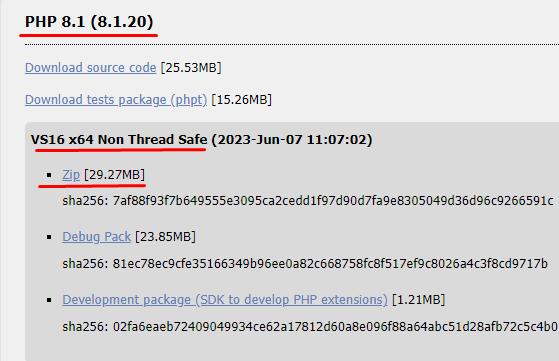
🚀 Non-Thread Safe (NTS)
- Designed for single-threaded execution
- Used by:
- PHP CLI
- PHP-FPM
- FastCGI
- Docker containers
- Faster and simpler
👉 Important rule:
If PHP runs as a separate process (CLI, PHP-FPM, Docker), you want NTS.
How PHP Runs in a Docker + Laravel Setup
When using Docker, PHP does not run on Windows at all.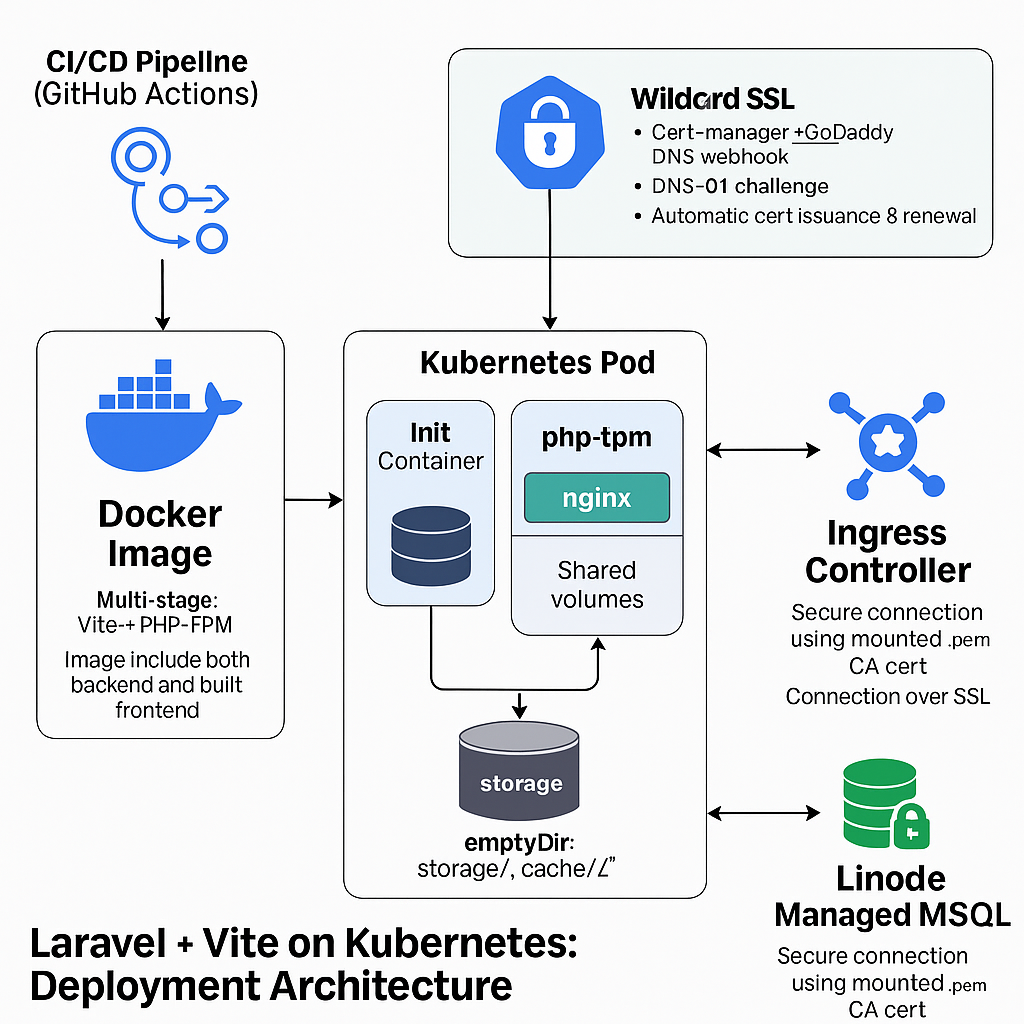
Typical flow:
Windows
 └── Docker Desktop
     └── Linux container
         └── PHP-FPM (NTS)
             └── Laravel
Key points:
- Docker runs Linux PHP, not Windows PHP
- Windows PHP (if installed) is only used by:
- Your terminal
- Your IDE
- Docker PHP and Windows PHP are completely separate
Do You Need PHP Installed on Windows?
❌ Usually NO
If you run everything like this:
docker compose exec php php artisan migrate
docker compose exec php composer install
Then Windows PHP is unnecessary.
Many teams:
- Uninstall PHP from Windows
- Let Docker handle everything
If You Do Install PHP on Windows, Which One?
✅ Install Non-Thread Safe (NTS)
This is the correct choice if Windows PHP is used only for:
- Composer
- Artisan
- PHPUnit
- IDE validation
🚫 Do not install Thread Safe PHP unless you explicitly use Apache + mod_php.
Quick Decision Table
| Use case | PHP build |
|---|---|
| Docker + Laravel | NTS (inside container) |
| CLI tools on Windows | NTS |
| IIS + FastCGI | NTS |
| Apache + mod_php (Windows) | TS |
If you don’t know why you’d need TS, you don’t need it.
How to Check Your Current PHP Type
CMD
php -i | find "Thread Safety"
PowerShell
php -i | Select-String "Thread Safety"
enabled→ Thread Safedisabled→ Non-Thread Safe
IDE Configuration (Very Important!)
Most problems come from IDE misconfiguration, not from Docker itself.
Let’s fix that.
VS Code + PHP + Docker (Recommended Setup)
Option 1: No PHP on Windows (Cleanest)
✔ Best choice if you rely fully on Docker.
- Uninstall PHP from Windows
- Disable built-in PHP validation
settings.json:
{
  "php.validate.enable": false
}
Use extensions like:
- Intelephense
- PHP DocBlocker
They don’t need a local PHP binary.
Option 2: Use Docker PHP for Validation
Create a helper script (Windows example):
@echo off
docker compose exec -T php php %*
Save it as:
docker-php.bat
Then configure VS Code:
{
  "php.validate.executablePath": "C:\\path\\to\\docker-php.bat"
}
Now VS Code validates code using container PHP, not Windows PHP.
Option 3: Use Local PHP (NTS)
If you install PHP locally:
- Install NTS
- Match the same PHP version as Docker
Example:
{
  "php.validate.executablePath": "C:\\php\\php.exe"
}
PhpStorm + Docker PHP (Best-in-Class Integration)
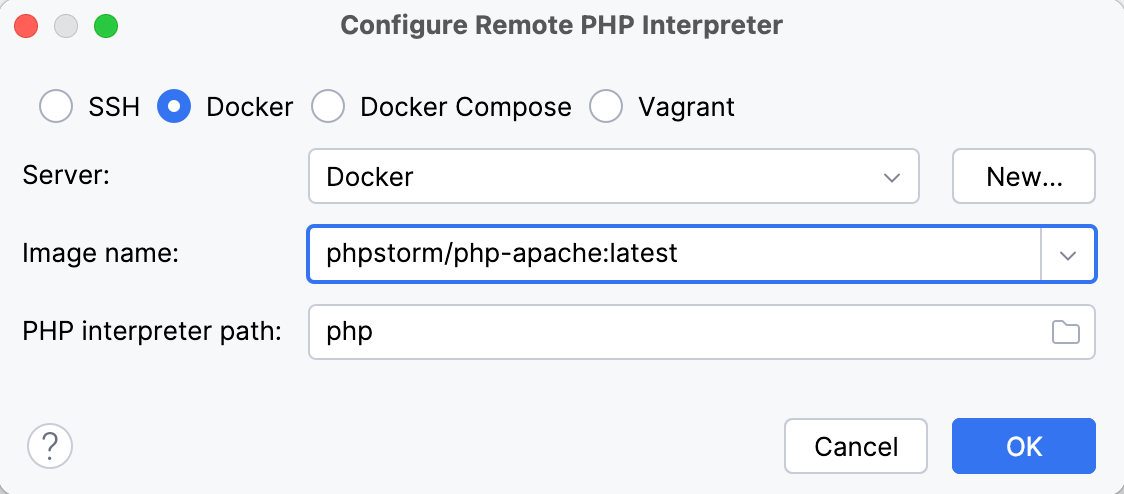
PhpStorm handles Docker extremely well.
Step 1: Configure Docker
Settings → Build, Execution, Deployment → Docker
- Add Docker Desktop
- Test connection
Step 2: Add PHP Interpreter (From Docker)
Settings → PHP → CLI Interpreter
- Click Add
- Choose From Docker / Docker Compose
- Select:
- docker-compose.yml
- PHP service (e.g.
php)
- PhpStorm auto-detects PHP version & extensions
✔ No Windows PHP needed
✔ Matches container exactly
Step 3: Configure PHPUnit / Composer / Artisan
PhpStorm will automatically:
- Run PHPUnit inside the container
- Use container PHP for inspections
- Avoid version mismatch errors
Common IDE Mistakes (And Fixes)
❌ IDE uses wrong PHP
Fix: Point IDE to Docker PHP or correct NTS PHP
❌ Multiple PHP versions in PATH
Check with:
where php
Fix:
- Remove old PHP paths
- Keep only one (or none)
❌ Extensions missing locally but present in Docker
Example:
ext-gd not found
Fix: IDE must use Docker PHP, not Windows PHP.
Best Practice (Recommended)
✅ Ideal Setup
- PHP runs only in Docker
- No PHP installed on Windows
- IDE uses Docker PHP
✅ Acceptable Setup
- Install NTS PHP
- Use it only for CLI & IDE
- Match Docker version exactly
Final Takeaway (TL;DR)
- Docker + Laravel = Non-Thread Safe PHP
- Thread Safe PHP is legacy and niche
- IDE issues usually come from wrong PHP interpreter
- PhpStorm + Docker = ⭐ best experience
- VS Code works great once validation is configured